# 🧠 Self-hosted LLM · vLLM + Portainer CE + Netdata
**Chạy LLM nội bộ theo chuẩn MLOps — case study mở cho cộng đồng**
*Running an internal LLM cluster the MLOps way — an open case study*
[](LICENSE)
[](https://docs.vllm.ai/)
[](https://docs.portainer.io/)
[](https://learn.netdata.cloud/)
[**Tiếng Việt**](#-tiếng-việt) · [**English**](#-english) · [**Live page**](https://khaitrang1995.github.io/llm-internal/)
---
# 🇻🇳 Tiếng Việt
## Bối cảnh
Nhu cầu chạy LLM nội bộ thường xuất phát từ ba lý do rất cụ thể: dữ liệu không được rời khỏi hạ tầng công ty, chi phí gọi API theo token tăng nhanh khi lượng request lớn, và độ trễ cần ổn định thay vì phụ thuộc nhà cung cấp bên ngoài.
Chạy được một model thì dễ — `docker run` là xong trong mười phút. Cái khó nằm ở phần còn lại: làm sao biết model đang khoẻ hay đang nghẽn, làm sao đổi model mà không ai phải SSH vào server, làm sao cảnh báo trước khi người dùng phàn nàn "hôm nay chat chậm". Case study này tập trung vào đúng phần còn lại đó.
**Môi trường tham chiếu:** Ubuntu 22.04/24.04 · 1–2 GPU NVIDIA (Ampere trở lên) · driver ≥ 550 · Docker Engine + Compose plugin.
## Kiến trúc
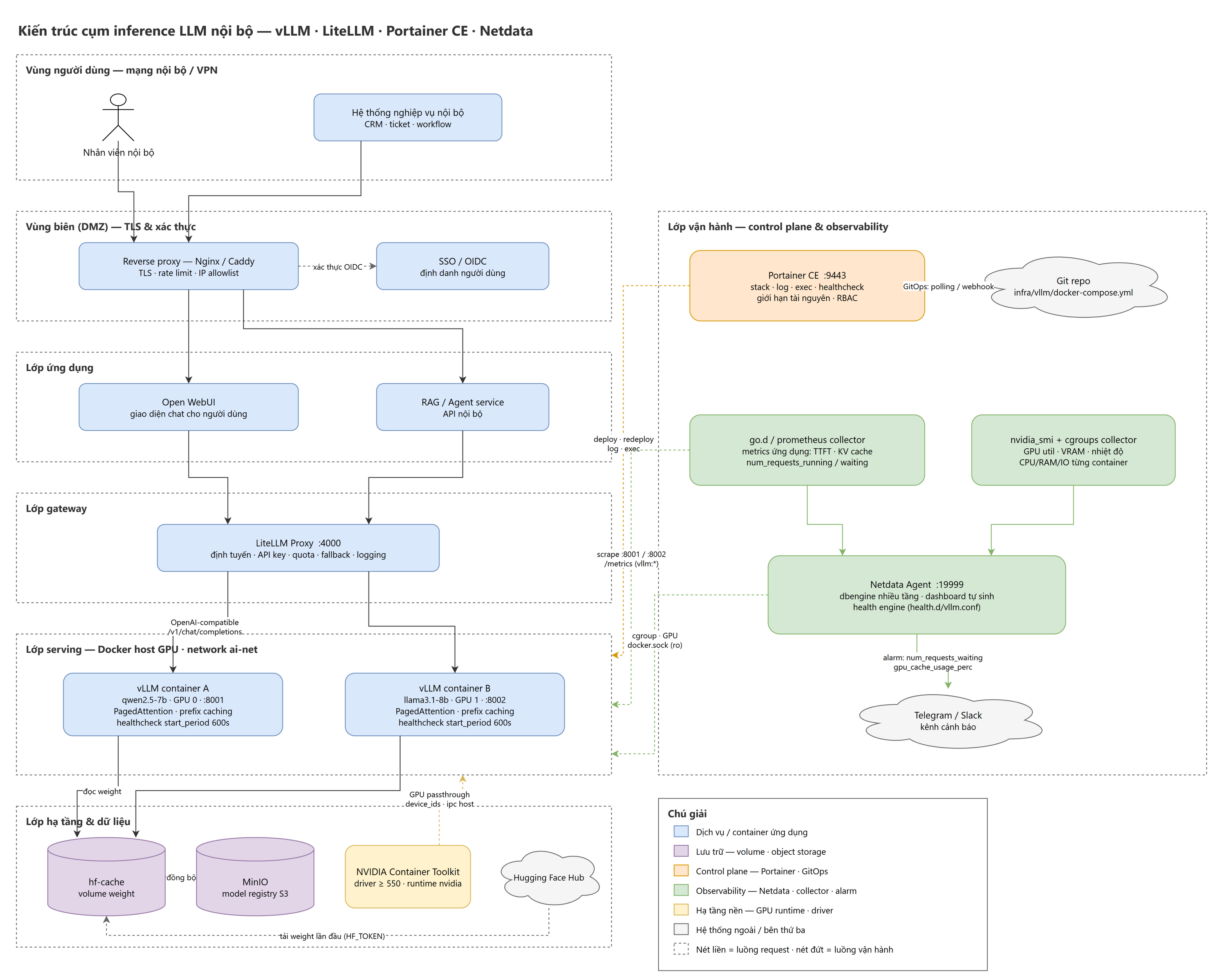
Sơ đồ đầy đủ ở trên. File nguồn: [`diagrams/architecture-llm-noi-bo.drawio`](diagrams/architecture-llm-noi-bo.drawio) — mở bằng [diagrams.net](https://app.diagrams.net), draw.io Desktop, hoặc extension *Draw.io Integration* trong VS Code. Sơ đồ chỉ dùng core shape nên không cần bật thêm shape library nào.
**Luồng request (nét liền)** đi thẳng từ trên xuống:
```
Người dùng / hệ thống nghiệp vụ
→ Reverse proxy (TLS · rate limit · IP allowlist)
→ Open WebUI · RAG/Agent service
→ LiteLLM Proxy :4000
→ vLLM container A/B (GPU 0/1)
→ hf-cache volume (model weight)
```
**Luồng vận hành (nét đứt)** chạy vuông góc, từ cột phải cắt vào lớp serving:
| Từ | Đến | Làm gì |
|---|---|---|
| Git repo | Portainer CE | GitOps — polling hoặc webhook khi có commit mới |
| Portainer CE | Lớp serving | deploy · redeploy · đọc log · exec · healthcheck |
| `go.d/prometheus` collector | vLLM `:8001` `:8002` | scrape `/metrics` — TTFT, KV cache, hàng đợi |
| `nvidia_smi` + cgroups collector | Docker host | GPU util · VRAM · nhiệt độ · CPU/RAM/IO từng container |
| Netdata Agent | Telegram / Slack | alarm khi `num_requests_waiting` hoặc `gpu_cache_usage_perc` vượt ngưỡng |
**Vì sao chia lớp:** ranh giới rõ ràng cho phép thay từng phần mà không đụng phần còn lại.
| Lớp | Thay đổi gì cũng chỉ chạm lớp này |
|---|---|
| Vùng biên (DMZ) | chính sách TLS, giới hạn IP, xác thực |
| Lớp ứng dụng | giao diện chat, logic RAG/agent |
| Lớp gateway | định tuyến model, API key, quota, fallback |
| Lớp serving | đổi model, đổi tham số vLLM, thêm replica |
| Lớp hạ tầng | driver, GPU runtime, nơi lưu weight |
| Lớp vận hành | cách deploy, cách giám sát, cách cảnh báo |
Đổi model chỉ là một commit sửa `--model` và `--served-model-name`. Đổi chính sách quota chỉ chạm LiteLLM. Đổi ngưỡng cảnh báo chỉ chạm `health.d/vllm.conf`.
## Stack công nghệ
| Thành phần | Vai trò | Vì sao chọn |
|---|---|---|
| **vLLM** | Serving engine | PagedAttention + continuous batching cho throughput cao hơn nhiều lần so với `transformers` thuần; expose sẵn API tương thích OpenAI nên client có sẵn dùng được ngay |
| **LiteLLM** | Model gateway | Một endpoint duy nhất cho nhiều model, quản lý API key, quota, fallback, logging |
| **Open WebUI** | Giao diện chat | Front-end sẵn dùng, nói chuyện với gateway qua API chuẩn OpenAI |
| **Nginx / Caddy** | Reverse proxy vùng biên | Chấm dứt TLS, rate limit, lọc IP — thứ duy nhất được nhìn thấy từ ngoài |
| **Portainer CE** | Control plane | Deploy stack từ Git (GitOps), xem log/exec/health, giới hạn tài nguyên, phân quyền — không cần SSH vào server |
| **Netdata** | Observability | Agent per-node, độ phân giải 1 giây, tự phát hiện container Docker và GPU NVIDIA, có sẵn storage engine + alarm nên không phải dựng thêm Prometheus/Grafana |
| **Docker + Compose** | Runtime container | Mọi thành phần là một service trong compose file nằm trong Git |
| **NVIDIA Container Toolkit** | GPU passthrough | Đưa GPU vào trong container; `runtime: nvidia` + `device_ids` |
| **MinIO** *(tuỳ chọn)* | Model registry | Registry model nội bộ, không phụ thuộc mạng ra Hugging Face Hub mỗi lần dựng node mới |
**Chi tiết đáng giá nhất của kiến trúc này:** Netdata có collector `go.d/prometheus`, mà vLLM lại expose metrics định dạng Prometheus tại `/metrics`. Nghĩa là một agent duy nhất thu được cả metrics hạ tầng (CPU, RAM, disk, cgroup từng container, GPU qua `nvidia-smi`) lẫn metrics ứng dụng (TTFT, KV cache usage, số request đang chờ) — nằm cạnh nhau trên cùng một dashboard, cùng một trục thời gian. Khi throughput tụt, bạn nhìn một màn hình là biết do nhiệt độ GPU throttle hay do KV cache đầy.
## Bắt đầu nhanh
> Ba file `*-stack.yml` dưới đây là **file bạn tự tạo** bằng cách copy compose từ hướng dẫn — repo này là tài liệu, không kèm sẵn compose file.
```bash
# 1. Kiểm tra GPU đã "xuyên" được vào container — bước này fail thì đừng đi tiếp
docker run --rm --gpus all nvidia/cuda:12.4.1-base-ubuntu22.04 nvidia-smi
# 2. Network dùng chung cho mọi stack
docker network create ai-net
# 3. Control plane
docker compose -f portainer-stack.yml up -d # https://:9443
# 4. Serving + gateway — deploy qua Portainer (Stacks → Add stack → Repository)
# hoặc trực tiếp:
docker compose -f vllm-stack.yml up -d # :8001 :8002 · gateway :4000
# 5. Observability
docker compose -f netdata-stack.yml up -d # http://:19999
```
Toàn bộ compose file, tham số vLLM và cấu hình collector nằm trong hướng dẫn: **[01-huong-dan-vllm-portainer-netdata.md](01-huong-dan-vllm-portainer-netdata.md)**.
## Metrics đáng theo dõi
| Metric | Đọc như thế nào |
|---|---|
| `vllm:num_requests_running` | Số request đang sinh token. So với `--max-num-seqs` để biết đã bão hoà chưa |
| `vllm:num_requests_waiting` | Số request nằm chờ. Lớn hơn 0 kéo dài nghĩa là thiếu công suất — cần thêm replica hoặc GPU |
| `vllm:gpu_cache_usage_perc` | Tỉ lệ KV cache đã dùng. Chạm gần 1.0 thì request bắt đầu bị preempt, độ trễ tăng vọt |
| `vllm:time_to_first_token_seconds` | TTFT — chỉ số cảm nhận trực tiếp nhất của người dùng |
| `vllm:time_per_output_token_seconds` | Tốc độ sinh token, quyết định cảm giác "chữ chạy nhanh hay chậm" |
| `vllm:e2e_request_latency_seconds` | Độ trễ toàn trình, dùng cho SLO |
| `vllm:request_success_total` | Đếm request thành công; so với tổng request để suy ra tỉ lệ lỗi |
## Sáu bài học rút ra
1. **`start_period` của healthcheck phải đủ dài.** Lần chạy đầu, vLLM tải hàng chục GB weight rồi mới build CUDA graph. Đặt 30s thì Docker kết luận container hỏng và Portainer hiện `unhealthy` màu cam trong khi model đang tải hoàn toàn bình thường. Đặt 600s cho lần đầu; sau khi weight nằm trong volume thì khởi động chỉ còn 1–2 phút. Ngược lại, `unhealthy` kéo dài quá `start_period` là tín hiệu thật, phải xem log ngay.
2. **Tách `--served-model-name` khỏi `--model`.** Tên model client nhìn thấy phải ổn định và độc lập với đường dẫn checkpoint thật. Đây là điều kiện để đổi model backend theo kiểu blue-green mà không client nào phải sửa code.
3. **Không publish cổng vLLM ra ngoài.** Bỏ hẳn mục `ports` của container vLLM, chỉ để gateway expose; các container gọi nhau qua network `ai-net` bằng tên service. Một endpoint vLLM mở là một GPU miễn phí cho người lạ — luôn đặt `VLLM_API_KEY`.
4. **Portainer mount `docker.sock`** nghĩa là ai vào được Portainer thì gần như có quyền root trên host. Đừng expose cổng 9443 ra Internet trần; đặt sau reverse proxy có TLS và giới hạn IP, hoặc chỉ truy cập qua VPN.
5. **Netdata bản agent tự host không có xác thực.** Cổng 19999 phải nằm sau cùng một hàng rào với Portainer. Đổi lại, một agent duy nhất lo cả metrics hạ tầng lẫn `vllm:*` trên cùng một trục thời gian.
6. **Ghi lại baseline ngay khi hệ thống còn khoẻ.** TTFT và throughput ở mức tải bình thường là con số duy nhất giúp bạn phân biệt "hôm nay chậm thật" với "hôm nay cảm giác chậm" khi có sự cố.
## Checklist chuẩn MLOps
Bản đầy đủ kèm giải thích nằm ở [mục 15 của hướng dẫn](01-huong-dan-vllm-portainer-netdata.md#15-checklist-nghiệm-thu).
**Cấu hình và triển khai**
- [ ] Compose file nằm trong Git, deploy qua Portainer GitOps, không sửa tay trên server
- [ ] Mọi image pin theo tag đã kiểm thử; production pin theo digest
- [ ] Model weight nằm trên volume riêng, không nằm trong lớp image
- [ ] `--served-model-name` ổn định, tách khỏi đường dẫn model thật
- [ ] Có `.env.example` trong repo và `.env` thật nằm ngoài Git
**Độ tin cậy**
- [ ] Cả năm service đều có `healthcheck` và đã thực sự đạt `healthy` một lần
- [ ] `start_period` của container inference đủ dài cho lần tải model đầu tiên
- [ ] Gateway khởi động sau lớp serving nhờ `depends_on` với `condition: service_healthy`
- [ ] Mọi service có `mem_limit`; service không phải inference có thêm `cpus` và `pids_limit`
- [ ] Có quy trình đổi model theo kiểu blue-green, đã diễn tập ít nhất một lần
**Bảo mật**
- [ ] Không cổng nào của vLLM/LiteLLM/Portainer/Netdata mở trực tiếp ra Internet
- [ ] `VLLM_API_KEY` đã bật, gọi `/v1/models` không kèm key trả về 401
- [ ] Netdata đã giới hạn binding hoặc có xác thực đứng trước
- [ ] Đã quét image bằng Trivy và lưu kết quả làm mốc so sánh
**Quan sát**
- [ ] Netdata thu được cả metrics hạ tầng, GPU và `vllm:*`
- [ ] Có alarm cho `num_requests_waiting` và `gpu_cache_usage_perc`, đã bắn thử thành công ra kênh chat
- [ ] Đã ghi lại baseline: TTFT và throughput ở mức tải bình thường
## Ranh giới của kiến trúc này
Kiến trúc này đủ nghiêm túc cho quy mô **một đến vài node GPU**. Vượt ngưỡng đó thì các giả định bắt đầu gãy:
- **Netdata thay Prometheus + Grafana** chỉ hợp lý ở quy mô nhỏ. Cần lưu trữ dài hạn tập trung cho hàng chục node hoặc truy vấn PromQL phức tạp thì bổ sung Prometheus — Netdata vẫn xuất dữ liệu ra được qua exporting engine.
- **Không có autoscaling.** Số replica cố định theo số GPU vật lý. Cần co giãn theo tải thì phải chuyển sang Kubernetes + KServe/Ray Serve.
- **Portainer là control plane một node.** Nhiều node thì dùng Portainer Agent hoặc chuyển hẳn sang orchestrator thật.
- **MinIO là tuỳ chọn.** Bỏ đi thì vLLM tải thẳng weight từ Hugging Face Hub về volume `hf-cache`.
## Nội dung repo
```
llm-internal/
├── index.html # landing page song ngữ (GitHub Pages)
├── README.md # tài liệu này
├── 01-huong-dan-vllm-portainer-netdata.md # hướng dẫn triển khai đầy đủ, 18 phần
├── 02-bai-dang-cong-dong.md # bản tóm tắt soạn sẵn để chia sẻ cộng đồng
├── diagrams/
│ ├── architecture-llm-noi-bo.drawio # sơ đồ nguồn (mxGraph XML, core shapes)
│ └── architecture-llm-noi-bo.png # bản xuất PNG @2x
└── LICENSE # CC BY-NC-SA 4.0
```
Sơ đồ vẽ bằng draw.io (chỉ dùng core shape) và xuất PNG @2x qua draw.io Desktop CLI.
## Đóng góp
Tài liệu này viết để chia sẻ cộng đồng — cứ thoải mái sao chép, chỉnh sửa, dùng lại trong tài liệu nội bộ của bạn. Nếu bạn chạy thử và gặp trường hợp khác với những gì mô tả ở đây (GPU khác, model khác, con số benchmark khác), mở issue hoặc pull request: phần giá trị nhất của một case study là những chỗ nó *không* đúng với môi trường của người đọc.
---
# 🇬🇧 English
> **Note:** the full deployment guide ([`01-huong-dan-vllm-portainer-netdata.md`](01-huong-dan-vllm-portainer-netdata.md)) is written in Vietnamese. Every compose file, flag and config snippet in it is language-neutral and copy-pasteable; this English section covers the architecture, the reasoning and the operational lessons in full.
## Context
Running an LLM in-house usually comes down to three concrete reasons: data must not leave company infrastructure, per-token API costs climb fast at volume, and latency needs to be predictable rather than dependent on an outside vendor.
Getting a model running is the easy part — `docker run` and you are done in ten minutes. The hard part is everything after: knowing whether the model is healthy or saturated, swapping models without anyone SSHing into the server, and getting alerted before users complain that "chat is slow today". This case study is about that everything-after.
**Reference environment:** Ubuntu 22.04/24.04 · 1–2 NVIDIA GPUs (Ampere or newer) · driver ≥ 550 · Docker Engine + Compose plugin.
## Architecture
The full diagram is at the top. Source file: [`diagrams/architecture-llm-noi-bo.drawio`](diagrams/architecture-llm-noi-bo.drawio) — open it with [diagrams.net](https://app.diagrams.net), draw.io Desktop, or the *Draw.io Integration* extension for VS Code. It uses only core shapes, so no extra shape library needs enabling.
**Request path (solid lines)** runs straight top to bottom:
```
Users / internal business systems
→ Reverse proxy (TLS · rate limit · IP allowlist)
→ Open WebUI · RAG/Agent service
→ LiteLLM Proxy :4000
→ vLLM container A/B (GPU 0/1)
→ hf-cache volume (model weights)
```
**Operations path (dashed lines)** runs perpendicular, cutting from the right column into the serving layer:
| From | To | What it does |
|---|---|---|
| Git repo | Portainer CE | GitOps — polling or webhook on new commits |
| Portainer CE | Serving layer | deploy · redeploy · logs · exec · healthcheck |
| `go.d/prometheus` collector | vLLM `:8001` `:8002` | scrapes `/metrics` — TTFT, KV cache, queue depth |
| `nvidia_smi` + cgroups collector | Docker host | GPU util · VRAM · temperature · per-container CPU/RAM/IO |
| Netdata Agent | Telegram / Slack | alarms when `num_requests_waiting` or `gpu_cache_usage_perc` crosses a threshold |
**Why the layering:** clear boundaries let you replace one piece without touching the rest.
| Layer | Changes that only touch this layer |
|---|---|
| Edge (DMZ) | TLS policy, IP restrictions, authentication |
| Application | chat UI, RAG/agent logic |
| Gateway | model routing, API keys, quotas, fallback |
| Serving | swapping models, vLLM flags, adding replicas |
| Infrastructure | drivers, GPU runtime, where weights live |
| Operations | how you deploy, monitor and alert |
Swapping a model is one commit changing `--model` and `--served-model-name`. Changing quota policy touches only LiteLLM. Changing an alert threshold touches only `health.d/vllm.conf`.
## Technology stack
| Component | Role | Why this one |
|---|---|---|
| **vLLM** | Serving engine | PagedAttention plus continuous batching gives many times the throughput of plain `transformers`; ships an OpenAI-compatible API so existing clients work unchanged |
| **LiteLLM** | Model gateway | One endpoint for many models, with API keys, quotas, fallback and logging |
| **Open WebUI** | Chat interface | Ready-made front-end that talks to the gateway over the standard OpenAI API |
| **Nginx / Caddy** | Edge reverse proxy | Terminates TLS, rate-limits, filters by IP — the only thing exposed outward |
| **Portainer CE** | Control plane | Deploys stacks from Git (GitOps), shows logs/exec/health, resource limits and RBAC — no SSH into the server |
| **Netdata** | Observability | Per-node agent at one-second resolution, auto-detecting Docker containers and NVIDIA GPUs; ships its own storage engine and alarm engine, so no Prometheus/Grafana to stand up |
| **Docker + Compose** | Container runtime | Every component is a service in a compose file that lives in Git |
| **NVIDIA Container Toolkit** | GPU passthrough | Exposes GPUs inside containers via `runtime: nvidia` + `device_ids` |
| **MinIO** *(optional)* | Model registry | Internal model registry so a new node does not depend on reaching Hugging Face Hub |
**The most valuable detail in this architecture:** Netdata has a `go.d/prometheus` collector, and vLLM exposes Prometheus-format metrics at `/metrics`. One agent therefore captures both infrastructure metrics (CPU, RAM, disk, per-container cgroups, GPU via `nvidia-smi`) and application metrics (TTFT, KV cache usage, queued requests) — side by side, on one dashboard, on one timeline. When throughput drops, a single screen tells you whether it is thermal GPU throttling or a full KV cache.
## Quick start
> The three `*-stack.yml` files below are **yours to create** by copying the compose blocks out of the guide — this repo is documentation and ships no compose files.
```bash
# 1. Verify the GPU reaches into containers — if this fails, stop here
docker run --rm --gpus all nvidia/cuda:12.4.1-base-ubuntu22.04 nvidia-smi
# 2. Shared network for every stack
docker network create ai-net
# 3. Control plane
docker compose -f portainer-stack.yml up -d # https://:9443
# 4. Serving + gateway — deploy via Portainer (Stacks → Add stack → Repository)
# or directly:
docker compose -f vllm-stack.yml up -d # :8001 :8002 · gateway :4000
# 5. Observability
docker compose -f netdata-stack.yml up -d # http://:19999
```
Every compose file, vLLM flag and collector config is in the guide: **[01-huong-dan-vllm-portainer-netdata.md](01-huong-dan-vllm-portainer-netdata.md)** (Vietnamese).
## Metrics worth watching
| Metric | How to read it |
|---|---|
| `vllm:num_requests_running` | Requests actively generating tokens. Compare against `--max-num-seqs` to see if you are saturated |
| `vllm:num_requests_waiting` | Queued requests. Sustained above 0 means you are out of capacity — add a replica or a GPU |
| `vllm:gpu_cache_usage_perc` | Share of KV cache in use. Near 1.0 requests start getting preempted and latency spikes |
| `vllm:time_to_first_token_seconds` | TTFT — the number users feel most directly |
| `vllm:time_per_output_token_seconds` | Token generation speed; decides whether text feels fast or sluggish |
| `vllm:e2e_request_latency_seconds` | End-to-end latency, the basis for your SLO |
| `vllm:request_success_total` | Successful request counter; divide by total requests for the error rate |
## Six lessons learned
1. **Healthcheck `start_period` must be long enough.** On first run, vLLM pulls tens of GB of weights before it even builds the CUDA graph. Set 30s and Docker declares the container broken — Portainer shows an orange `unhealthy` while the model is loading perfectly fine. Use 600s for the first run; once weights are on the volume, startup drops to 1–2 minutes. Conversely, `unhealthy` persisting past `start_period` is a real signal — read the logs immediately.
2. **Decouple `--served-model-name` from `--model`.** The name clients see must stay stable and independent of the real checkpoint path. That is what makes blue-green model swaps possible without a single client code change.
3. **Never publish the vLLM port.** Drop the `ports` section on the vLLM container entirely and let only the gateway expose anything; containers reach each other by service name on `ai-net`. An open vLLM endpoint is a free GPU for strangers — always set `VLLM_API_KEY`.
4. **Portainer mounts `docker.sock`**, so anyone who reaches Portainer effectively has root on the host. Do not expose port 9443 to the raw Internet; put it behind a TLS reverse proxy with an IP allowlist, or reach it over VPN only.
5. **The self-hosted Netdata agent has no authentication.** Port 19999 belongs behind the same fence as Portainer. In exchange, one agent covers both infrastructure metrics and `vllm:*` on a single timeline.
6. **Record a baseline while the system is still healthy.** TTFT and throughput under normal load are the only numbers that let you tell a real slowdown from a perceived one when something goes wrong.
## MLOps-grade checklist
The annotated version lives in [part 15 of the guide](01-huong-dan-vllm-portainer-netdata.md#15-checklist-nghiệm-thu).
**Configuration and deployment**
- [ ] Compose files live in Git, deployed via Portainer GitOps, never hand-edited on the server
- [ ] Every image is pinned to a tag you have tested; production pins by digest
- [ ] Model weights live on their own volume, not baked into an image layer
- [ ] `--served-model-name` is stable and decoupled from the real model path
- [ ] `.env.example` is committed and the real `.env` stays out of Git
**Reliability**
- [ ] All five services have a `healthcheck` and have each reached `healthy` at least once
- [ ] `start_period` on inference containers covers the first model download
- [ ] The gateway starts after the serving layer via `depends_on` with `condition: service_healthy`
- [ ] Every service has `mem_limit`; non-inference services also have `cpus` and `pids_limit`
- [ ] A blue-green model swap procedure exists and has been rehearsed once
**Security**
- [ ] No vLLM/LiteLLM/Portainer/Netdata port is exposed directly to the Internet
- [ ] `VLLM_API_KEY` is set, and calling `/v1/models` without it returns 401
- [ ] Netdata is either bound to loopback or sits behind authentication
- [ ] Images have been scanned with Trivy and the result kept as a baseline
**Observability**
- [ ] Netdata collects infrastructure metrics, GPU metrics and `vllm:*` alike
- [ ] Alarms exist for `num_requests_waiting` and `gpu_cache_usage_perc`, and a test alert has actually landed in the chat channel
- [ ] A TTFT and throughput baseline under normal load has been recorded
## Where this architecture stops
It is serious enough for **one to a few GPU nodes**. Past that, the assumptions start to break:
- **Netdata instead of Prometheus + Grafana** only makes sense at small scale. For centralised long-term storage across dozens of nodes or complex PromQL, add Prometheus — Netdata can still export into it.
- **No autoscaling.** Replica count is pinned to physical GPUs. To scale with load, move to Kubernetes with KServe or Ray Serve.
- **Portainer is a single-node control plane.** For multiple nodes use Portainer Agent, or move to a real orchestrator.
- **MinIO is optional.** Drop it and vLLM pulls weights straight from Hugging Face Hub into the `hf-cache` volume.
## Repository contents
```
llm-internal/
├── index.html # bilingual landing page (GitHub Pages)
├── README.md # this document
├── 01-huong-dan-vllm-portainer-netdata.md # full deployment guide, 18 parts (Vietnamese)
├── 02-bai-dang-cong-dong.md # ready-made summary for sharing (Vietnamese)
├── diagrams/
│ ├── architecture-llm-noi-bo.drawio # source diagram (mxGraph XML, core shapes)
│ └── architecture-llm-noi-bo.png # @2x PNG export
└── LICENSE # CC BY-NC-SA 4.0
```
## Contributing
This is written to be shared — copy it, adapt it, reuse it in your own internal docs. If you run this and hit something different from what is described here (different GPU, different model, different benchmark numbers), open an issue or a pull request: the most valuable part of a case study is where it does *not* match the reader's environment.
---
**License / Giấy phép** · [CC BY-NC-SA 4.0](LICENSE) — chia sẻ và chỉnh sửa tự do cho mục đích phi thương mại, có ghi nguồn / free to share and adapt for non-commercial use with attribution.
[TikTok @techspherexai](https://www.tiktok.com/@techspherexai)